Showing posts with label Blogging Tips. Show all posts

Friday, 6 May 2016

How To Make Money Online by Establishing a Good Blog

blog

As the internet has spread across the world, people have found numerous ways of making money online. Some people establish shops, others create YouTube videos.

However, creating a website, or a blog, can be quite a lucrative idea and a chance to turn a hobby into something more serious.

Setting up a blog is fairly easy nowadays, due to the existence of platforms such as WordPress and Blogger. However, there are some necessary steps you should take in order to increase your chances of succeeding.
Read more �

Friday, 1 April 2016

How To Improve your Blog Search Ranking on Google

How To Improve your Blog Search Ranking on Google?

This is an ever green question which often comes to your mind, when you want to improve your traffic, leads, sales, etc...

Whatever methods we practice to market our blog, Search traffic is an indispensable source of traffic, Infact it is one of the best way to direct potential buyers/readers to your blog.

To generate search traffic, Search ranking is a must. If your blog isn't within the top 5 in the first page of search result for you targeted keyword, you're loosing about 60% of possible attention/visitors in the search results.

Means most of search visitors goes to the top 5 links in the google search results. Thus it's important to improve your blog search ranking.

Today, I'm going to share some tips that you can use to build your search ranking, Thus improving the organic traffic of your blog.
Read more �

Saturday, 26 December 2015

How Email Marketing Can Do Wonders for Boosting Blog Traffic

How Email Marketing Can Do Wonders for Boosting Blog Traffic

The key to a successful blog is getting visitors.

The more traffic you generate to the site, the more awareness you create about your brand, and ultimately the more money you stand to make. The hard part for many bloggers is finding the right traffic and getting them to come back on a continual basis.

Though there are many ways to generate traffic to your blog, one method that has been proven to work wonders is email marketing.

Read more �

Monday, 16 November 2015

Why New Content Should be a Part of Your SEO Strategy

Why New Content Should be a Part of Your SEO Strategy

While some business owners wonder, what is online marketing and how can I utilize it efficiently, others are already ahead of the curve implementing full-blown strategies that include content generation.

Why is content such an important part of SEO?

Because content is still king online.
Read more �

Monday, 17 August 2015

How to Write Content for People and Search Engine

How to Write Content for People and Search Engine

Should I write for Readers?

Should I write for Search Engines?

Have you ever asked these questions while writing an article for your blog? If yes, you're not alone. Bloggers often ask these questions to themselves. Some even argue that you should focus on people rather than search engines. Focusing on people is a good thing, but is it all right to negate the search engine.

I'd say you should focus on both: People and Search Engines.

Why?

The answer is simple, Let's say you write your articles for people, Your blog visitors will love reading your content. As a result your blog visitors will turn into loyal subscribers or customers but for that to happen you need blog traffic which bring new visitors.

Blog traffic can be gained through SEO and Marketing. Apart from marketing search engine optimization (SEO) plays an important role to generate organic traffic to your blog.

So, We need to focus on both to Create an Epic Blog Post.

Okay, Let's not delay any further, Today we're going to learn How to write engaging content for people and optimize it for search engines.
Read more �

Friday, 7 August 2015

How To Monetize your Blog and Why Most Fail?

How To Monetize your Blog and Why Most Fail?
In this Internet age many people are interested in blogging and thousands of blogs are started every day. Among those most wish to make money from blogging as part time or full time, but Only a handful of those bloggers are worth mentioning and making a decent income through blogging. Many of you may have wondered,

Why can't I Make Money Online?

What am I doing Wrong?

If yes, Then keep reading. This is for you.

Today, we are going to see about why most of the bloggers fail to make money through blogging and what are the best ways to monetize your blog.

Read more �

Saturday, 1 August 2015

How To Protect your WordPress site from being Hacked

How To Protect your WordPress site from being hacked

WordPress is one of the most popular and preferred Content Management System, its known for being one of the most user-friendly website platforms available online. Due to it's popularity and growing users base, WordPress is a popular target for hackers and spammers.

Even through there is no way to completely protect yourself against hackers and security threats towards your WordPress blog/Site. A determined hacker will find his or her way into your site whether you like it or not.

All we can do is make it difficult for the hacker to have his or her way with your site. Most hackers will give up and look for an easier/unprotected site to hack since there are lots of wp sites now-a-days.

Today we will talk about tricks and plugins to keep your WordPress blog safe from hackers. If you follow the advice given below, a hacker will surely find it difficult to gain access to your site.
Read more �

Sunday, 22 February 2015

How To Fix Your Website When It Gets Hacked?


Fixing hacked websites


It's not uncommon for sites - even large ones with lots of protection - to get hacked. Security is a major problem these days. And if your site gets hacked, it can get damaged in a number of ways. You could lose all your data, or lose its ranking due to malicious activity. So while you can take periodic backups, you cannot prevent someone from hacking into your site. The best and most practical thing to do in such an event is to recover your site as fast as possible so that the effect of the attack is neutralized/minimized.

Here are some tips shared by Google for getting your website back on track after it has been hacked.


Clean up malicious scripts


Hackers can target your site for any number of motives. From taking down your website and deleting its content to simply adding backlinks discreetly, there's a lot that can be done. If you notice suspicious content appearing on your website, delete those unnecessary pages immediately. However, don't just stop there.


Hackers will often insert malicious scripts into your HTML and PHP files. These could automatically be creating rogue backlinks or even new pages. Make sure you check your website's source code and see for any malicious PHP or JavaScript code that could be creating such content.


Maintain your CMS


Websites often get hacked due to vulnerabilities in a CMS that get patched with updates. If you're running an older version, your site is more susceptible to attack. Make sure you keep your CMS updated, and use a strong password for login. If possible, enable two-step verification to secure the login process.


www vs. non-www


www and non-www URLs are not the same. http://www.example.com is not the same as http://example.com - the former refers to a sub-domain 'www', whereas the latter is the root of your site. When checking for malicious content, verify the non-www version of your site as hackers often try to hide content in folders that may be overlooked by the webmaster


Other useful security tips


  • Avoid using FTP when transferring files to your servers. FTP does not encrypt any traffic, including passwords. Instead, use SFTP, which will encrypt everything, including your password, as a protection against eavesdroppers examining network traffic.

  • Check the permissions on sensitive files like .htaccess. Your hosting provider may be able to assist you if you need help. The .htaccess file can be used to improve and protect your site, but it can also be used for malicious hacks if they are able to gain access to it.

  • Be vigilant and look for new and unfamiliar users in your administrative panel and any other place where there may be users that can modify your site.


Got any questions? Feel free to leave a new thread in our discussion forum. You can read the post from Google along with a couple case studies here. Good luck (:

Wednesday, 18 February 2015

What To Look For When Hiring Ghostwriting Services?


Ghostwriting


Are you looking to hire a ghostwriter? As you know, there are a large number of individuals and service providers offering such services, and businesses are increasingly hiring them to write business eBooks or blogs to serve their marketing purposes. However, the question remains: how do you hire a ghostwriter? A recent post by Vorongo posted by Cameron on what do you need to look for when hiring a ghostwriter inspired us a lot and we thought we can share our experience on this subject to better help webmasters in hiring authors for their blogs.Check out these five must-have qualities your ghostwriter should have.


1. They Must Have Industry Knowledge


Your ghostwriter should understand the genre or industry you need them to write for. Having a firm understanding of the in�s and out�s will make your manuscript, blog post, or article stand out.


An exceptional ghostwriter is one who intentionally follows up on industry news and current trends. Your ghostwriter should not have to do a vast amount of research to take on your project. Everyone has their strengths and weaknesses, so it will not make them a bad person if they do not meet your qualifications. It just means they are not meant to work on your project.


2. They Must Sign and Respect the Confidentiality Agreement


You are hiring this person to be your writer and make your publication stand out. You, however, don�t want the masses to know that it was not you doing the writing. So signing a confidentiality agreement is a must and may not be a complication for them to do so. However, just because they have signed one, does not mean they are adhering to it.


Conduct a thorough interview with the potential writer. Remember, your ghostwriter must not only sign a non-disclosure agreement with you, but must adhere to prior ones they have signed as well. So in asking for their published articles, if you find they are showing you pieces of work they�ve completed for others, it means they would turn around and do the same to you. This is not ethical practices, and they are not the ghostwriter for you.


3. They Must Show Proof of Publishing


Now, although it�s been stated that they should not show off their ghostwriting work, they can, however, show you their own publications and other writing pieces. A ghostwriter does not become one overnight. In fact, they may have had a terrible time writing as a career for themselves so turned to ghostwriting. Ask to see their portfolio of which should include:


  • Their current publications

  • Articles, blogs, novels, and other literature pieces clients have given permission to use

  • A list of references


You want to see proof they can write better than you can. Check for organization of their writing and if they have ideas to help you shine.


4. They Are Flexible and Able to Meet Your Needs


Flexibility is key in the writing industry. You have deadlines to meet and need your ghostwriter to help you maintain them. The ghostwriter that you choose should understand and be capable of showing you that your time is valuable. They should:


  • Coordinate with you for interviews, transcription, and idea creation

  • Work around your schedule

  • Show patience with revision requests you may have


5. They Represent You Well


Finally, your ghostwriter should match your voice and represent you well. When someone reads your work, it should accurately reflect you to the point where a close friend or family member believes you wrote the piece. In the samples they show you of their work using their name, it should reflect one particular style. If they show you ghostwritten pieces, keep in mind it�s meant for that particular client, so the style of writing will change.


Remember, the purpose of your hiring a ghostwriter is to reflect your story on your timetable. Choose one that will compliment your unique style and respect the relationship you two must build to create the perfect story.


Questions and feedback is warmly welcomed! Do share your precious views on ghostwriting buddies!


Monday, 9 February 2015

How To Get Great Content Ideas For Your Blog?


Content ideas


Brainstorming for content ideas can be tough. You easily get distracted and everything seems to have already been written! To make matters worse, requirements to content concepts and titles have become much more complicated. With the growing importance of referral traffic, we now have to rethink title strategies and how they appear on social sites. If you're feeling strapped for content ideas, here are a few that can help.


Check your Comments Section


When you let people share and comment on your site, you could end up with some great blog post ideas. Your readers might ask for more information about a specific item you didn�t cover clearly in your first post, or they might share their own opinions about the topic, which could make your fingers itch to write. Reading those bits carefully could make your blogging much easier.


Check out the Competition


According to 2014 stats, more than half of all small businesses don�t have a website. As a result, your top competitor may not have a blog that you can follow. But that same competitor might be active on social media sites like Twitter and Facebook. The posts you find there could give you great ideas about topics you should cover.


If you grab an idea from someone else, be sure to tweak it or amend it or somehow make it your own. Stealing outright could get you in hot water, both with your competitors and with Google. But borrowing a good idea could help you to come up with the story idea that�s been eluding you.


Yelp Pages


People with reputation management problems are likely accustomed to the idea of using Yelp as an early warning system. When they see a poor review pop up, they know they must get to work generating content that either refutes or explains the complaint. But Yelp can also help you write blog posts about issues people either like or have questions about.


Read through your reviews and look for items that get a lot of mentions. Not all Yelp comments will contain blog gems, of course. Some might just contain complaints or random bits of praise you can�t build on. But, watching the comments closely could give you some great ideas for writing that will really resonate.


Targeted Keyword Research


And ofcourse, nothing beats good ol' fashioned keyword research. This is a fundamental part of the writing process, as it helps you find the right terms which will perform better on SERPs. But more than SEO, your searches can also help you to find out what people are looking for, and that could give you some excellent blog post ideas.


With Google AdWords� Keyword Planner, you can run a simple search on a topic you�re planning to cover. Your results page will give you keywords that are similar to the topic you�ve hit, but they come with just a few changes.


We'll soon publish an entire section dedicated to keyword research in the SEO process, so stay tuned!


Coming up with new content ideas is not easy. But if poke around and are receptive enough, with enough luck you will soon find great content ideas to go on your blog! Good luck :)

Saturday, 12 July 2014

How to Protect Your Blog from Being Copied

How to Protect Your Blog from Being Copied

This is a Guest Article Written by Joe Pawlikowski, Who writes and edits for several blogs, earning his living through blogging and consulting.

You wouldn't walk into a book store and steal a novel off the shelf, would you? What about a magazine off the rack?

For most of us, physical theft is unthinkable. We wouldn't shoplift as much as a candy bar, never mind a book or magazine. They don't belong to us. If we want them, we have to pay. Just like everyone else.

So why is it that people feel free to steal content on the internet? How is stealing a blog post different than stealing a magazine? In both cases you're taking something that someone else created. Yet people steal on the internet without a second thought.

People steal on the internet for two primary reasons. Kevin Kelly describes the first.

"The Internet is the world's largest copy machine. What the Net does is it copies things."

Copying is part of the Internet's DNA. Your site copies itself many times, on archive pages. As you can imagine, creating a tool to copy the internet isn't difficult.

The second reason: you can access internet content from anywhere for free. Yes, you can access book and magazines for free inside a store. We've all seen people sitting down in a book store aisle reading a book. But you can't take the book from the store without paying. With a blog, you can read it anywhere. Hence, people are more apt to think that because it is free, it is also free to take.

Let us be clear: it is not OK, in any way, to take someone else's content. It belongs to them, just as a book belongs to the store. (And the content belongs to the author or publisher.)

Let us be clear on another point: it is the owner's job to police theft. Book stores have security measures that detect theft. Publishers seek out people reproducing content without permission. Though they don't have the same resources available, bloggers are responsible in the same way. If you want to prevent people from stealing your content, you have to protect it.

Bloggers, Who are serious about ownership of their content will heed the following tips.
Read more �

Tuesday, 25 February 2014

Do You Know These Little Known Benefits Of Creating Longer Posts?

Benefits Of Creating Longer Posts
This is a Guest Article Written by Ammar � A young blogger who blogs on All Blogging Tips and likes to help small bloggers in building a profitable blog.

After deeply analyzing the benefits and harms of longer blog posts, I think its time for me to let the world know about it too.

In simple words, don't just always trust and follow what someone else, me or your friends say and instead try and experiment it yourself.

If you believe that something can work better if you add some points from your side, you probably should. With that being said, let me take you to the list.
Read more �

Thursday, 28 November 2013

Infographic: How to Choose a Domain Name

Infographic: How to Choose a Domain Name

In all areas of your business, you put time and consideration into the decisions you make, and when it comes to your domain name, consideration is key. Choosing a brand name is one of the most important things you can do for your business. And not just a brand name, but a domain name, as well. Whether you use your company's name or a different name when you set up your website, you have to take many things into consideration. Your brand should convey a great deal of information about you company, your product or service, your goals, and your personality, as well.

Any trademarks, logos, and images that are a part of your website and marketing scheme should be considered when choosing your domain name, and understanding the importance of the extension (whether .com, .net, .org, or another option), as well. If you're only selling in a specific country your domain name extension will be different than if you're selling internationally, for instance.
Read more �

Friday, 16 August 2013

5 Reasons Why Bloggers Fail To Make Money

5 Reasons Why Bloggers Fail To Make Money

Do you make serious money from your blog?

Do you make any money?

About 90 percent of bloggers will answer no to the first question, and many of those will also answer no to the second. Making money online has never been more difficult. All of the methods we used a few years ago have become incredibly ineffective, leaving bloggers scrambling for new ways to earn. Many of them have stopped blogging completely.

You don't want to stop blogging, do you?

The good news is that you can, indeed, earn a decent income while blogging. In a recent guest post I talked about getting people to buy from your blog, which is a great way to turn traffic into money. But today the focus is not on how to make money from your blog, but rather why you're not making money right now.
Read more �

Sunday, 28 July 2013

6 Most Horrible Design Mistakes That Bloggers Make

6 Most Horrible Design Mistakes That Bloggers Make

Blogging and designing are two totally different things and sweet thing is that mostly designers are not bloggers, but bloggers are always designers.

Bloggers do a lot of designing to their blogs without anyone's help, which is certainly a good thing. But bad thing is that while they do this, they make a lot of horrible mistakes which will let to the failure of the blog.

Now you must be thinking about your blog and questioning your designing ability and your creativity so without further I do, here are some horrible design mistakes that bloggers make no matter knowingly or unknowingly.
Read more �

Saturday, 29 June 2013

How To Get People To Buy Stuff from Your Blog

How To Get People To Buy Stuff from Your Blog
If your blog relies on advertising to earn money, chances are you haven't quit your day job. While advertising can bring in some money, the average blog earns enough to pay the hosting bill and little else. The blogs that do earn big money from advertising are the ones with massive traffic, multiple million unique visitors per day.

Chances are your blog will never reach that traffic level, and so your blog will not earn you a livable income from advertising alone. How can you make your blog profitable then? By following an age-old formula.
Read more �

Saturday, 8 June 2013

Google Tips to Optimize International Websites


International Websites


Have you ever considered delivering your content for multiple regions and in multiple languages? More and more websites are going international (being made available in multiple languages) these days, and you can easily see why. The broader the audience, the better. And unless you have a region specific website, there's no reason why you should not go international. However, there's a lot more to it than just translation, as emphasised by these quick tips from Google for internationalization.


1. Change your markup instead of your style sheets


Learn where to use markup and where to use CSS for internationalization (shortened to i18n after the starting character i, and the 18 character spaces between the first and the last n). Things like language are inherent to the content present on page. So in this case, markup should be used for i18n. You can't always rely on CSS. So use attributes like lang and dir (for direction) with the html tag as shown below.


<html lang="en" dir="ltr">


Note: In some cases, i18n markup might not be supported by the markup language, as is the case with XML. In such cases, CSS may be used.


2. Use a single CSS file


When using different languages and directions (LTR or RTL), do not use a separate style sheet for each locale. Use a single CSS file, and bundle together existing CSS rules with their international counterparts. A single file makes it easier to maintain things, and only a single file needs to be loaded. Consider a scenario where the default CSS file loaded, but the international file failed to load. A single file approach would be better in that case.


3. Use [dir='rtl'] attribute selector


A language can either have an RTL (Right to Let) or LTR (Left to Right) directionality. RTL directionality requires different markup than LTR. So you can use the [dir='rtl'] attribute selector in this case. For example;


aside {   float: right;}[dir='rtl'] aside {   float: left;}


4. Look carefully at position properties


As in the example above, you often need to reverse or mirror the position properties for RTL and LTR languages. For example, what's aligned left in LTR should be aligned right in RTL. So you should look at all the position-related properties for LTR, and mirror them for RTL. These include margins, padding, text-align, float, clear, and so on. There are tools out there as well that do the job for you, such as CSSJanos .


5. Look closely at the details


Just like with CSS positioning properties, you might want to mirror some other details as well, such as box-shadow for images, text-shadow for text, arrows, background, markers, and so on. Same goes for JavaScript positioning and animations.


Another very important aspect is the fonts and font sizes. A font size for one language might seem adequate, but it may be too small for other languages. For example, Arabic texts usually need to be bigger than English texts because they're difficult to see in a smaller font.


So keep an eye out for details, and feel free to contact us if there's a problem. We'd love to help. Cheers :)

Friday, 10 May 2013

Basic SEO Tips for a Newly Launched Blog - Beginners Guide


SEO tips for beginners

Blogging is more than just about creating an online space for yourself and putting up content there. You have to be the best in order to compete with the best. But even becomes less important when it comes to optimizing your blog for search engines. After all, you want your great content to reach your potential readers, right? Otherwise, what's the point? This is the part where Search Engine Optimization (SEO) comes in. In this post, we'll take our beginner readers through the basic SEO process - things they should implement on their own blogs.


Before you move on, make sure you've covered the following parts in our blogging series.


Part 5: Basic SEO Tips for a Newly Launched Blog - Beginners Guide


Google Webmaster tools


Google Webmaster Tools is your friend! Whether you like Google or not, you will have to sign up for Google Webmaster Tools (GWT). GWT is basically a dashboard where you can not only get yourself verified as an official owner of your site, but also get access to a lot of tools, features, and reports. With GWT, you can change how Google sees your website, and even receive messages from Google regarding updates, and errors found on your website.


With GWT, you can;


  • View Crawl Errors, Crawl Stats, Blocked URLs Index

  • Fetch as Google - Pretty handy for fetching data for your website and submitting it to index to ensure that it's indexed more quickly.

  • View search queries, and internal/external links

  • Submitting sitemap (discussed below)

  • ...and so much more.


Submitting Sitemap


The first thing to do after making a proper website or blog is to create a sitemap, and submit it to Google. A sitemap is basically a listing of the contents of your blog, sort of like a table of contents. It needs to be submitted to search engines so they know what content to find on your blog. We recommend that you put up some content first before creating and submitting a sitemap. A round 10 posts on your blog should be enough to get you started.


When you submit a sitemap, search engines use the data on that sitemap to locate your site and your data, and index it. You might have noticed that your site didn't appear on Google after you created it. Well, to get it into search results, Google first needs to index it. And to make Google index it soon, you submit a sitemap.


To submit a sitemap, you first need a sitemap generator. For Blogger blogs, you can use the tool on the following link.


If you're using WordPress, then you just need a plugin called "Google XML Sitemaps". Either way, it's a simple process and only takes a few simple instructions.


Keep monitoring your rank and statistics


Now that you're a blogger and have started generating good content, it's time you should start monitoring your success. Keep track of your PageRank, which comes out every three months. The last one came in February this year. You should also keep a check on your Alexa Toolbar ranking. For monitoring your website statistics, you should use Google Analytics.


Basic SEO Tips


We have shared many SEO tips with our readers before. Here is a round-up of some of the posts we've written. Check them out!


You might also like reading a couple SEO guides that come directly from Google


These basics tips and guides should get anyone started good with optimizing their website. If you still have questions, please feel free to ask in the comments section. And please, try to stay on-topic here. Thank you :)


Monday, 6 May 2013

5 most practiced Ways of building Active blog Readership


Building readership

So you've taken the first steps into blogging, and have set up a blog (and purchased a hosting or at least a domain hopefully)? Far from the job being done, we are only now getting started. Granted that choosing a blog topic, setting up a blog, buying a custom domain and hosting etc are some of the hardest parts. But that's as far as your decisions go. The next phase is to build upon those decisions. So now that you have started a blog, it is time to start building a readership!


Here's what we have covered so far in this blogging series;


Part 4: 5 most practiced Ways of building Active blog Readership


Social media


Social media is your one-stop-shop for building your readership. People nowadays don't just want to visit websites. They want content to appear right on their screens while they are surfing through their social network news feeds. For this, you need to create social media profiles for your business, because you need people to visit your site again and again, and not just the first time.


Google Plus


Google has gone to great lengths to make people use its social media that is Google Plus. Now, as a regular internet, you might not have fancied it much. But as a blogger and/or a webmaster, having a Google Plus presence is a must. Google Plus users gain an advantage in search results as their content can be +1'd by readers, they get an AuthorRank which informs PageRank, and so on.


You can create a fan page on Google Plus for your blog right from your own personal account. Read the following to get an idea of what Google fan pages are, and how to create them.


Google Plus is about making connections. Follow others, so that they may follow you back. Participate in conversations, and generally socialize with people. Google favors social people when calculating AuthorRank.


Facebook


More than a Billion people use Facebook. Almost every internet user is using Facebook. As a business, your online presence on Facebook is a must.


Facebook Pages, much like Google Plus Pages, can also be created through an existing personal profile which won't effect the page. If you just go to Pages, and create a New Page (and follow the simple instructions) your page will go up live on Facebook for everyone to see. you should share your updates on this page, and it will get you likes and a steady referral traffic in return.


With Facebook, your posts can go viral easily. People who like or comment on your posts also make your post visible to their friends, who in-turn, can make it visible to their friends. This way, you can reach out to a lot of extended circles. You can actually see how viral each of your posts is.


Email marketing


Email marketing refers to reaching out to people and marketing yourself via email. It is perhaps the most important aspect of building a readership, and here's why.


Normally, new users learn about your website via search engines. But what if you had thousands of unique visitors daily, but then got hit by a major Google algorithm update such as the Panda? All those visitors would vanish instantly! If only there was a way to retain all those, or even a fraction of those visitors! This is where email marketing comes in.


email marketing


People who like the content on your site might want to visit again, and might bookmark your site. But even bookmarking is temporary, and people often tend to delete them. You need to make them stick - to make it more substantial. Getting people to subscribe to your blog is a great way to do so. They will simply leave an email address, which will be added to your subscriber list. You can then market your brand to these subscribers via email, so they can access your content without visiting your site. On top of that, the traffic that comes from such people is steady, and not prone to change with changing search algorithms.


Feedburner


There are various email subscription software that you can employ on your blog. One of them is Feedburner, which is free. It is powered by Google, so you can simply log in using a Google ID. To be able to use it, create an account (if you don't already have one), and then from the dashboard, burn a new feed.


Enter your blog's URL, and then click Next. Then follow the simple instructions to create a new feed. This feed comes from your blog, and is updated whenever you create new content on your blog. This feed can then be used to send out newsletters and updates to your subscribers, power RSS feeders, and so on.


Premium email software


If you think you're pro enough to move away from free services, then you can try premium ones like Aweber. It is a professional email subscription software like Feedburner, but with a lot of options for scheduling, customization, auto-responding, and email marketing, something Feedburner lacks as a freeware service. Aweber and similar services are excellent for business. But for most bloggers, and especially starters, Feedburner will do the trick.


These channels should be enough to get you started for now. And indeed, they might all you need for a long time. We here at MBT built our readership by using these alone. It isn't hard, it's just time-consuming. If you have the patience, you will definitely succeed.


Got any questions? Feel free to ask. We'd also like your feedback on what basics you want to know, so that we can add it to our series. It helps others learn. And learning is what we strive for. Cheers :)

Thursday, 25 April 2013

Replace your blogspot domain with a Dot com domain From Godaddy


Go Daddy Deal of the Week: Get a domain for $4.95! Offer expires 7/31/12


One thing that makes people, who want to start a blog, hesitate is the set up of a custom domain. Even people who have a free blog don't immediately want to move to a custom domain, because it all seems like a a lot of work, and too complicated at that. Many are unsure as to where they should get a domain from, and are afraid they'll get scammed online. We have compiled this small guide to help such people overcome their hesitation, and take the big step that will essentially influence the growth of their blog. For this purpose, we walk you through Domain setup from GoDaddy, a large and reputable domain registrar.


Update: MBT Readers can signup now for an account with a special discount of 35% on all purchases: Offer Expires 30th april!


Before we move on, let me remind you that this post is a continuation of our Blogging Guide for Beginners series. If you have missed something, you can find it below.


Part 2: Replace your blogspot domain with a Dot com domain From Godaddy


Recommended: 10+ Reasons why you should buy a custom domain for Blogger


What is GoDaddy?


GoDaddy is a large and reliable domain registrar and web hosting company that serves millions of domains - so you can be sure that they won't be running away with your money. The best thing I like about GoDaddy is, it is integrated into Google Blogger. If you have a Blogger blog, you can simply buy a domain from inside your Blog's dashboard!


Why choose GoDaddy?


GoDaddy offers some of the cheapest domain rates you could get anywhere. Their .com domains (which are usually the most expensive) can be purchased for as low as $10 (even $7 using some discount offers). They also give you plenty of features you can employ to extend the functionality of your blog.


  • Hosting with site builder - A basic free and easy to use website builder for beginners who'd like to make a small website of their own in no time at all

  • Easy starter guide - A detailed step-by-step guide to help beginners get started online

  • Personalized emails - Get your own email addresses (you@yourdomain.com) instead of the conventional you@gmail.com (or similar) emails

  • Sub-domains - Create personalized sub-domains such as contact.yourdomain.com instead of just www.yourdomain.com

  • Domain forwarding - Easily forward or redirect to another domain

  • And much more.....


Buying a domain


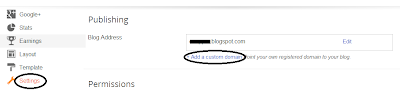
Buying a domain through Blogger is extremely easy. From your dashboard, click on Settings. Under the Publishing section, click on the Add a custom domain option.


Buying a domain through Blogger


You will get an option to choose from among a list of top-level domains (.com, .net etc). Choose any, and then continue to next step. Blogger will check with GoDaddy whether your domain is available or not. If it is, you can continue to domain registration, which is basically a form you have to fill.


Once filled, you can proceed to Google Checkout. It will ask for your credit card details, and will charge you only $10. Once the transaction is successful, you're all done! Sit back and relax as the Blogger team sets up and configures your DNS settings. Once this is over, you will be able to access your site at www.yoursite.com!


Was this post helpful to you? Do give your feedback in the comments section below. And remember: please keep your comments relevant, and avoid spamming and/or promoting your own blog/business. Thank you :)