Showing posts with label Google Plus. Show all posts

Monday, 22 April 2013

Install GooglePlus Comments Widget on custom Blogger Templates


Google Plus comments on Blogger

Blogger recently implemented Google Plus comments on their Blogger platform, and we know that many bloggers like you have gone ahead and implemented this new functionality to your blogger blogs. But a lot of our readers have been asking us how to add Google Plus comments, or Google Plus comments API  to Blogger custom templates? This feature turns on and off smoothly for default templates. But most bloggers don't use default templates. For them, we have compiled this short tutorial on how to implement Google Plus commenting system on custom Blogger Templates.


Why enable Google Plus comments?


Google Plus comments are much more flexible, and allow you to keep track of your conversations better. They also help keep the discussions organized. Besides, readers can share their comments, or make comments on your Google Plus posts to make them appear on your blog. This expands your reach as your followers' extended circles can see your content too.


Although there's some controversy regarding the usefulness of this commenting system versus the harms (something we discussed at length in our last post), the choice is really yours. But if you do want to implement this feature on your custom Blogger templates, then here's how you can do that.
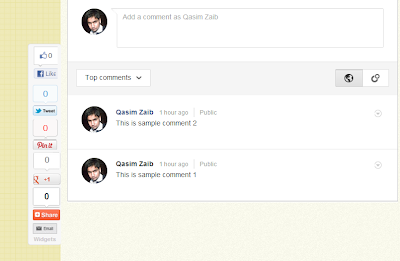


Google Plus comments


Enabling Google Plus comments


To start off, first log into your Blogger account, and click on the blog you want to add Google Plus comments to. Now, click on the Google+ option on the left sidebar. You must be the admin of a blog to be able to view this option.


Now, you need to upgrade our account, and integrate it with Google Plus if you haven't already done so. You will get a "Get Started" button if you haven't. Follow the simple instructions, and then move on to the next step.


Check the option that says Use Google+ Comments on this Blog - For default templates, this is pretty much all you need to do.
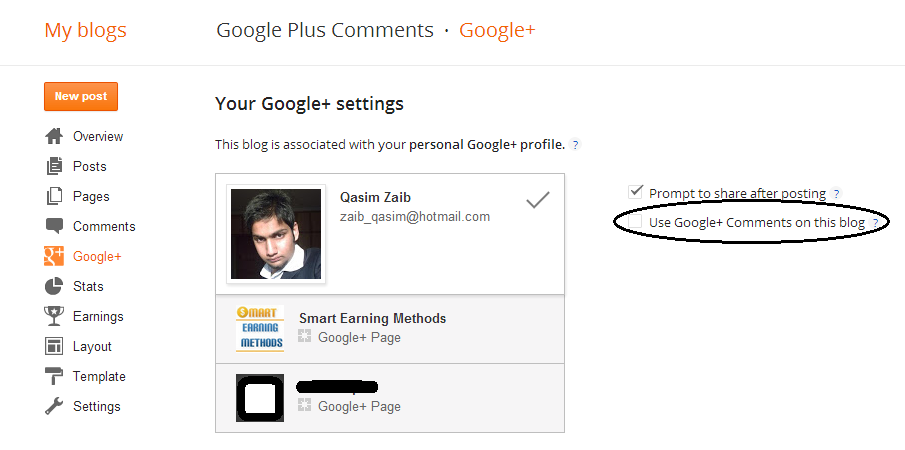


Enable Google Plus comments


For custom templates, here's what you need to do;


  • Click on the Template tab from the left sidebar, and then click on Edit HTML.

  • From the code editor, press Ctrl + F, and search for 'threaded_comments'


  • You should see the following lines of code


<b:if cond='data:blog.pageType == & quot;static_page&quot;'>

   <b:if cond='data:post.showThreadedComments'>

      <b:include data='post' name='threaded_comments'/>

      <b:else/>

      <b:include data='post' name='comments'/>

   </b:if>


</b:if>

<b:if cond='data:blog.pageType == & quot;item&quot;'>

   <b:if cond='data:post.showThreadedComments'>

      <b:include data='post' name='threaded_comments'/>

      <b:else/>

      <b:include data='post' name='comments'/>

   </b:if>


</b:if>


  • Replace the code written in bold with the following line.


<b:include data='post' name='comment_picker'/>


Take care not to make a mistake while editing. And it would be a good idea to backup your template (Backup/Restore option at the top-right), just in case.


For comments to work on custom templates, you need to add the code as well as to enable it. You can see the demo of a custom template above for yourself. I hope this post answered all your questions. If not, please feel free to ask more questions in the comments below. Cheers :)


Some Disadvantages of enabling Google+ comments on Blogger?


The Google Plus comments integration with Blogger is turning quite some heads now, and a lot of bloggers have gone ahead and implemented it. This seems to be one of the biggest improvements in Blogger over the recent past. And at first glance, it looks pretty slick, with a clean and solid implementation. It makes things really easy, especially for bloggers who can track the conversation more easily. At the same time, readers can contribute right from Google Plus, without needing to open the blog. However, upon closer inspection, it seems that the new implementation isn't without its flaws.


It has been some days since this feature came out - plenty of time for us to play with it. And there do seem to be some disadvantages of using this new commenting system. These might manifest themselves later on, if not immediately.


Disadvantages of using Google+ comments on blogger


Firstly, to use this feature, users need to use their Google account ID, which can be a bit of a problem for readers who are using alternatives.


But the real problem lies in the fact that this commenting system is dependent upon the URL of your blog. If you change the URL, for example when you are migrating to another domain or re-branding, you will not be able to migrate these comments, and they will be deleted! Unlike Facebook Comment API, Google comments aren't stored on any app accounts. This means that migration is not an option, and that, you'll lost all your comments should any such thing happen.


Another big disadvantage is the increase in Page Load Speed. It takes some time before all the data is fetched from Google. Usually, this isn't noticeable, but try loading your blog on a slow dial-up connection, and you will see those comments appear much later.


Some people have also reported that the comment statistics are no longer accurate (or sometimes visible).


All in all, it's a pretty good package, but Google really needs to spend some more time with it. If you have problems, or have suggestions, please feel free to comment in the section below. Cheers :)

Monday, 24 December 2012

Tips To Create a Successful Google+ Community


google plus communitiesUnlike Facebook, Google plus has still a long way to go in terms of popularity and user profiles. Although Google has had been trying really hard to promote Google plus by affiliating it with all the other products that comes under the same brand, people often find this social network a dry one indeed. An interesting point here is the fact that Google plus offers more or less, a similar flavor to the users that they enjoy using Facebook, there is still something lacking when it comes to moderate the communities effectively. While the moderators seem confused about how to give a boost to their Google+ communities, Google seems to notice it and has now come up with some worth following solutions.


If you are looking for how to create and maintain a Google+ community successfully, you have got the right platform. We will first discuss the Dos� and Donts� that you need to take care of in order to attract followers and keep them involved in your community.


What you need to do?


No one likes to be a part of an unknown territory. Try promoting your community by targeting the potential followers, presenting your community as a platform where they can share their ideas.


add communities


What has been generally seen is the fact that owners often create a community and do not participate themselves. As a devoted owner, participate in the conversations, interacting with the followers, giving them a feeling that there is someone who is interested in listening and replying to them.


People love to know about hot stuff, they love more discussing it. Share latest and controversial news and ask for feedback. Most of the time people only speak when they are asked to.


Business has its own decent rules. Offering some power to the devoted followers is what keeps them glued to your community. Try adding moderators to your community who can manage content and help you out in keeping the platform alive.


Neither you, nor I know everything, isn�t it? How about learning from the followers and teaching them what they might not know? This is what helps building a smooth community.


Apart from the above stated must-do things, you should also add categories in your community to help guide discussions. We will discuss about categories in later part of the post.


What you Should Not Do?


Just breaking hot news on a community is not enough. What people mostly do is they often state the information without making it worthy enough to attract a single look of the reader.


People, usually the newbies aim high and work really low to reach their desired levels. In order to attract a good deal of followers you should first provide a reason to the readers to follow you. Never invite people to join your empty community. In fact, prepare your welcome message and expectations note before inviting followers so that when they land up on your community they get reasons to stay.


Never leave your community unmoderated. This is truly what brings a disaster to even those communities that initially survive to gather a considerable followership.


How to Use Categories in Google+ Community?


If you are a google+ user who is running a community too, you must know its importance. Categories, as the name suggests, organize the discussions in your community. These categories gives an idea to the member that what your community is all about in the first place, and next, in what topic he is interested in. Say if you have a community related to online business, a category for each section might be like, blogging, surveying, freelancing, etc.


google plus communities participation


Adding Discussion Categories:


Select Edit Community from action menu.


How to add Moderators to your Community?


Google+ is turning into an easy place to deal with. Adding moderators to your community is what that helps you only. To add moderators:


  1. Click members below your community�s photo


  2. Click the drop-down menu to the right of the member you�d like to add as a moderator


  3. Click Promote from member to moderator


What Moderator are allowed to do?


1) Add and edit categories


2) Remove posts


3) Remove members from the community


4) Ban members from the community


5) Add additional moderators


Works become easy and systematic if you know how to do it. Google Plus is the next huge social media or probably the biggest in upcoming days because what makes Google Plus a strong contestant is its backbone; that is Google, itself! Google Plus communities are significantly important in the online business strategies and one must know how to deal with them properly.


Best Wishes


Friday, 21 December 2012

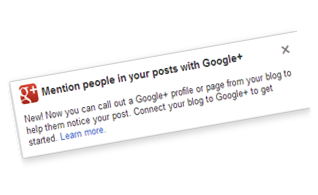
Now You can Mention People inside Blog Posts with Google Plus!


mention people in BloggerRunning an online business through blogging can be really tough if you are not aware of how to manage your readers. What is generally seen is the fact that many bloggers often interact with their readers too friendly that their readers start taking their piece of knowledge for granted. There are no doubts about the value of the readers and a blogger should interact with his readers but again in a professional way.


Believing in the importance of smooth conversations in between the publishers and the readers, Google has now introduced a new way to link your devoted readers in your blogger post editor.


How to Link People?


Everybody loves to have an attention, its human nature. When it comes to your devoted readers, who contribute on your posts, sharing the best of their ideas, adding useful stuff on your blog, you really need to take them in consideration. With this new option, been introduced by Blogger, you can now add links of Google+ profile your readers, if needed. You can even link Google+ pages when you have to mention a person or a page in your blog


Here it is that how can you value your readers or people who somehow relates to your post.


1) Type �+� in your Blogger post Editor, followed by the name of the person who you want to add in your post.


2) The link would then be shown in your post


3) After sharing your post from Blogger to Google+, the linked person would be notified in the sharebox.


4) Clicking on the link would redirect the readers to the person�s Google+ account.


link people on blogger


Therefore, If you have some dedicated readers or hard-working co-authors like us, then you can now credit them by adding their Google+ links in your post.


Hoping to get some good notifications in my sharebox by Mohammad and other readers, (:D) from now onwards, leaving you on a note that value people who can contribute in your success!


Best Wishes,


Wednesday, 9 November 2011

How To Create a Google+ Page?

Google Plus pagesJust Like Facebook Like Pages, Google+ has introduced the fan, followers or +1 pages for web masters thus providing them better option of driving traffic to themselves by updating their readers through Google Plus. Google+ Pages are now also available for local business purposes. Soon you will be able to submit your Site or Blog RSS Feed to Google+ to automatically update your readers whenever you publish a new post. Lets now create a cool Google+ Page for your blog by following the easy steps below.


Create a Google Plus Page

  1. Choose Local Product or Brand as your category

Google Plus pages


       3.   Fill up the details with your website title and URL.

       4.  Accept the Terms and hit the create button

        5. You have now successfully created a Google+ page!

The next step would be to inform all your friends in your Google+ profile to join your Fan page. Simply follow the easy instructions that may follow up. Describe your blog in 10 simple words and upload your blog logo. After which you will be asked to share your page on your profile as a post. Do it in order to inform everyone about your new Fan page.

How To Delete Google+ Pages?

In case you wish to delete your fan page then simply follow these steps:

  1. Go To your Google Plus Homepage
  2. Near your profile pic click the drop down menu and select "Manage Your Pages"

delete Google Plus page

    3. Click the Delete link next to your page and Job done!

delete page

What's next?

In my next post I will share how to create a Google+ page Badge. Stay tuned! :)

Tuesday, 25 October 2011

Replace Blogger Profile with Google+ Profile

google plus profile for blogger

Finally Google+ now jumped to Blogger. Blogger team announced yesterday that now you can Use your public Google+ profile on all your existing BlogSpot blogs. Upon switching your default Blogger profile will be replaced with Google+ profile and all your posts, comments and Author profile widget will be redirected to your Google Plus profile. Your blog pseudonym will be replaced with your common name. Your blog photo and info will be replaced with that in Google plus. This option works at present with Blogger in draft and after few weeks it will work on blogger.com too.


The three main features that this shifting offers are:

  • You will get access to upcoming Google+ features on Blogger
  • your social connections (friends) will see your posts in their Google search results page with an annotation that tells them that you've shared the post. Thus increasing your blog traffic! See below:

annotation for your blogger posts

  • Most importantly it would give you one Unique identity. All your Google Accounts will now use one common name. Your Common is the nickname that you chose on Google+.

Important Notes

However this shift may seem exciting but you need to first note these important points:

  • Upon switching to your Google+ profile,you will have only 30 days to revert back to your old blogger profile. After the time limit is crossed, your Blogger profile data will be deleted permanently.
  • Information on your Blogger profile won't be transferred to your Google+ profile, so you must manually copy your blogger profile data to Google+ before making the automatic switch.

After having read all the pros and cons lets now make the move!

Change Blogger Profile To Google+

  1. Click this link: Switch to Google+ profile
  2. Read the instructions carefully, agree to the terms and hit the "Switch Now" button
  3. Done!

Try this new change after you have backed up your blogger profile data and see if you like it. If things were not delightful then simply revert back. Make sure you revert back within a month. I hope this latest news may be interesting for most of you. :)

Thursday, 20 October 2011

Fundamental Tips for Google Plus beginners

google plus tipsGoogle Plus has created a lot of sensation among the existing and new social network users. Its rapid success and user-friendly interface is setting new records. Here, are some interesting tips for new users. Learn them well and enjoy this new social media site on the internet:


Let�s invite friends and family

It�s not difficult, but quite interesting to invite friends on your Google Plus account. You can easily learn how to invite friends on your Google Plus account. If interested, then follow the steps:

  • Visit the Google Plus network and login your account

  • Make some sensible and crispy streamline like a message and it should be an invitation, which allows them to join you on this network

  • Next, you will find a textbox where you have to insert the e-mail ids of your friends and family members. Once it�s done, then you can share this message with them, which you have already created

  • Now, you have to click on the �share� button. By doing this, your message will be floated to those guys. Only those can receive your message who have been invited by you

  • After this, everyone will receive an e-mail message where they can click on the specified Google Plus link to get connected with each other

Yes, you can also remove them

You can organize your friends with this great social networking site. This new social media site is fully loaded with different features like adding or removing friends from your account. It�s quite easy as you can add lots of friends and your family members in your �Circle.� Then, you can also have the right to remove someone.

We all know that sometimes we have to take some strict actions against some �rotten eggs� for our security and peace of mind. The annoying personalities can be in our own social circle. So, it�s better to kick them away before they create some trouble, especially when you have added your family members.

You can follow a logical sequence, which can direct you to get rid of some trouble creators.

  • Start with clicking on the �Circles� option, which you can find on the top navigation of your account

  • Now, you can double click on the specific circle where he is added. It will generate the list of all members of the particular circle

  • Select and just remove him from the face of your circle, but don�t try to click him again. It will �de select� the option and he will remain in your circle. Once you click it, it will be highlighted. Now, just remove it by clicking �remove� option available on the top

You can download data from Facebook

If you are already using Facebook or some other social media site, then it will be quite difficult for you to live the dream on Google Plus. How would you be going to interact with them, as they will be on Facebook and you will be isolated here?

Don�t worry! Google Plus has better options for you as you can move contacts from you Facebook account to your new Google Plus account. You don�t have to make a lot of efforts to move them onto your Google account. If you think that moving contacts from your new account is difficult, think again, because Google can facilitate you very well.

You can use Yahoo to transfer all of your contacts to this new account of yours:

Note: Please read this separate tutorial on transferring Facebook contacts to Google+

  • Visit Yahoo and make a new account there. After creating account, you can go to the �contacts� option

  • After that, you can select the option, �import contacts�

  • Now select, �Facebook�

  • Make sure all of your contacts are available there

  • Now, open your account at Google Plus and then open, �Circles�

  • Here, you have to click on �Find� and then click on �Invite�

  • Then again, click on Yahoo and follow the sequence by selecting the option, �invites�

  • It�s done now, all you have to do is to arrange them in your �circles now

It�s time to customize the page

Don�t you want to have a page, which is customized according to your personal likes and dislikes? If you do like, then you can customize your page easily. After all, it�s all about your impression on the profile page and you can�t compromise on good impression. Your impressive profile will reflect your aesthetics.

You can follow these steps to easily customize your profile:

  • First login, then click the third tab

  • Your profile will be visible, at the right side, you can click on �edit�

  • Now, edit the page as you like

  • Your mouse movement will make certain content �editable.� So, do what you want to and make it in accordance with your own taste and preferences

Did you see the magic? If not so, try applying these tips properly and open the wonders of Google Plus today!


This article is written by Kevin Moor who writes for online-virus-scan.org, a site reviewing and testing various online virus scan issues.

Monday, 12 September 2011

Google+ API Launch Far From Near

develope google plus appWith Google+ emerging as a better social connecting network; application developers (and just the curious student programmers) are eagerly waiting to start with some cool google + app. Of course everyone of us wish to develop and setup a Google+ app but how?
Fortunately or unfortunately, google+ API is not yet available to public. API (Application Programming Interface) can be understood as protocols or rules for building specified software applications. Google+ engineers and programmers are taking their time to develop a stable API before involving thousands if not millions of 3rd party developers with them.

It makes total sense to deal with complexities of API first rather than having users play with an application developed for under refined platform. And then cope with the unsatisfied customers blaming google+ and not the developers for the bugs.


One of google+ developer has given a statement about API launch being months away. So, it is still a lot of time to wait, unless you become the �trusted tester�. Sign in here: Google Plus Developers Page to receive updates about development opportunities and get a chance to preview an app before it is released to public.


News submitted by Lubna Essa. You can follow her at lubna.essa@live.com

Sunday, 4 September 2011

Google Plus Posts are now crawled by Google Robots!

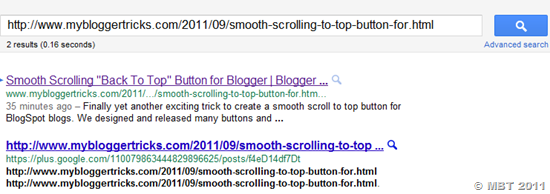
I had heard that Google will soon crawl data shared on their newly born Google+ social network in order to bring a new change in their search pattern. Amazingly just today I searched for one of my posts and I was shocked to see that even my Google+ status post appeared in the search results page. This shows how significant role will G+ plus play in days to come. I will highly suggest that you +1'd all your posts and add a Google Plus badge to increase the number of your followers because this new sharing +1 button has a lot to disclose for Search engine Optimization experts and before its too late you must start making good use of it. I had expected this to come after the introduction of +snippets. Please see the screenshots of the SERPs that I observed:


google plus crawled


You can clearly see my Google+ post appearing just after my main blogs post page. I must assure you that I received this result while I was not online on G+ i.e I didn't log into Google Plus. I then further investigated to see how the results will appear when you log into your Google+ account. I received this result:

Google Plus indexed

The only difference that you would see is that my profile image is appearing below my blog link indicating that I have recommended/voted the post.

As you can see Google robots are indexing the links shared on your Google+ profiles along with the Google+ post URL. Which means that both your blog link and Profile Post URL are being indexed and displayed in search results. I must say it can turn out as a great traffic boosting gift for webmasters with large G+ following. In order to increase your Google+ profile you must take these steps urgently:

Monday, 29 August 2011

1000+ Google Plus Icons Free Download

+1 buttonIf there is anything I love a lot then it is designing Icons. What I had decided to do this time the guys at webdesignshock did it before me and way way better than I expected. The icon set today contains a bundle of Google+ icons featuring this new social network in its extravagant pose. This free icon set contains different color variations and sizes. The freebie includes both vector (PNG) and pixel perfect Photoshop source files (PSD). The set contains both colored and gray versions to help you use them in your web designing projects. The package also contains original Illustrator and PNG files for Google +1 Buttons, all of them at the highest quality level

If you liked the icons set then please tell your friends also by either tweeting it, FB liking it or +1 recommending it.

Where can you use Google+ Icons & +1 Buttons

Icons can be used for different graphic purposes. If you are a web designer then you will need them to give a more cutting edge and clear look to your templates. If you are a developer busy developing an Android, iPhone or any smart phone app then you will need icons with clear edges and neat pixels. So as you can see it depends on how you use them. Most importantly if you are a blogger user then you will surely need +1 Buttons to give a more neater look to your blog templates.

Download Google+ Icon Set

Click here to download the following icon set

Google Plus icons

The screenshot contains just few icon displays. The entire icon list can be seen once you download the collection.

Download +1 Buttons

Now click here to download tons of Google +1 button for giving a new edge to your design works.

image

Google Plus buttons

Please share this post with everyone you know. That's only favour we need in return. Peace and blessings be upon you all. Have fun. :)

Wednesday, 24 August 2011

What are Google +Snippets and Inline annotations?

+snippets and inline annotationsFinally Google+ released the most awaited feature and that was sharing site content with your circles. Now whenever your +1 a page you will be provided with a share on Google+ option, by choosing which you can post on your profile a thumbnail image, description and link to that website. It works similar to Facebook like button now. This new option is named +snippets. Google released this new feature just few hours ago and they have also released Google+ inline Inline annotations which are simple display of your friend's profile images next to the +1 button. Lets know more about these two new features.

What are +Snippets?

Now whenever you share content from the +1 button, you�ll notice that the button automatically includes a link, an image and a description in the sharebox. Take an example below. If you +1 the button at the top-right-corner of this page you will notice an option that says "Share on Google+" clicking this option will create the following display:

Note: At present only registered members can see new features like +Snippets. First submit your ID at our Google+ Platform Preview and then come back and +1 the button on our blog to see the effect.

+snippets

Just like how Facebook does, you can now see an image, Page title link and description. Its indeed a great new functionality for web owners and bloggers who want to increase their website traffic. It will indeed increase site pageviews and thus revenue.

What are Inline Annotations

This feature help increase visitors engagement after users see a friend�s recommendation right on your page. The visitor will see profile pics of his friends next to your +1 button. The visitor will indeed now pay more attention to your site and will spend more time reading your blog posts which will surely decrease your bounce rate and bring a significant PageViews boost.

image

What do you think?

This two new added brilliant features is again a response to Facebook like button and like box plugins. I am sure we have a lot more to see. I am really enjoying the way Google is developing their social network bomb. Kindly share your views on this latest development. 

Tuesday, 23 August 2011

5 Best Ways to Make Money Online With Google+

MAKE-MONEY-WITH-GOOGLE+ PLUSInternet is the biggest market in todays world. Business offline is slowly turning into an online one and finding space in world wide web. With the invent of new services such as the new social networking site Google Plus, not only does the service provider benefits but even people like me and you can expect to earn a happy living online through it. Below I will be listing five possible ways of making money online through the newly born social networking bomb " The Google+"

Note: All these tips are not ordinary beating around the bush. If you have great business skills then you will find out your way online through this post InshAllah.

1) Develop a Google+ application

The most benefited and lucky people are the web developers in this case. If you have good programming skills then you must try hard to develop an app for G+ users that may benefit them in some regard. This app can be a game, Mozilla or Chrome Add-on, or even a self hosted API. Just visit the Mozilla and Chrome add-ons and extensions page and you will see how much downloads are made per day for those apps. Further you can submit your app to Android Market and Apple iOS store. The more downloads/hits your app receive the more backlinks, traffic and exposure your site will get. Always create a website for your app and then submit it at stores. Once your app becomes an entertaining and useful necessity for people then they will even donate you and companies will try to purchase the product from you. Remember how angry birds guys made their way.

2) Blog about Google+

My fundamental blogging principle is when a news is hot in the market then talk hot about it. You get traffic only if you understand the global demand of the people. Write updated content. When Christmas is near, write about Christmas when Ramadan is going on write about Muslim products and when Google+ is the talk of the year then talk about Google+. More blog traffic means more page views and consequently more blog revenue through the Ad impressions and clicks.

3) Create a Google+ Club

If you are a keen and loving social person then you can use your friend circles to earn some bucks. Try to increase number of your Google+ followers as much as you can and once you have surpassed the 500-1000 limit then you can sale out +1'd recommendations to web owners. Rankings widely depend on social networks and web owners can spend enough money to buy tweets, Facebook likes and Google+ recommendations to rank their content higher.

PS: You can find people selling 100 +1'ds at $200! Google it for yourselves.

4) Hire Developers & Advertise Your Google Plus Product

If you cant create or develop an app then hire a local programmer and invest some bucks on him so that he could create a user-friendly app for you. Not all people have a business sense or business mind and there are a lot of young teenagers who still have a lot of potential but lack business skills so you can hire them to work for you. People invest a one time money up to $500 and the next day when the product attracts traffic they earn in $200 per day. Just realize that you must not always run after profit and do not always try to fight with yourself that why can't you do something. If you can't do something then buy one who can do it and sale the talent!

After your App is ready, spend some bucks on Google Adwords or buysellads to attract some visitors especially bloggers to your product site. Exposure is important!

5) Create a Dedicated G+ Blog

Blogs work best when they are based on specific categories. A blog that speaks about everything like mine often suffer a lot (=p) If your new blog is solely based on Google+ customization tricks and apps and tools, then believe it or not, you can earn around $400-$800 per month with that blog if within a year it succeeded in receiving at least 5000 visitors per day.

Follow my post frequency tip and see the traffic boost effect within two months.

What do you think now?

Trust me it is not a day dreaming. Whatever I am sharing above is what I always wanted but due to university and responsibilities at home and current blog load I often can not. I am sure if you cant follow Tip#1,3 or Tip#4 then you can try out your luck at Tip#2 and Tip#5. I wish you may turn out to be successful web owners and web marketers and whatever you read may help you in reaching the stage you always dreamt of. Nothing is impractical when you think practical. Good Luck! :)

Wednesday, 17 August 2011

Google+ Invites Limited to 150 Per User

I just came to know that now all Google+ users are restricted to 150 invites only. You can at most invite 150 people on a single Google Plus account. Google+ now also provides you with a unique invite share URL or link that you can post anywhere to invite friends directly. This is the same invite link that is blocked by Facebook. You can find this unique URL on your Google+ homepage towards the right sidebar under "Send invitations - 150 left" Upon clicking it you can easily copy the invite URL and share it with friends on forums, blogs and social networks to invite more and more people. You can invite people by email or by a share link as shown below,


Google+ invites limit


Google+ invites URL

You can clearly see that only 150 sign ups can be made per account. So invite only close friends and use the limit carefully. This is done so that the social network may not become a spam spot or adventure park where anyone would come and go. Only active social people are allowed to join Google Plus. Since we still have 150 invites left so you can post your email ID's below for an invite as we have enough accounts and the limit does not bound us. :p

Facebook is Blocking Google+ Invites: The Social Media War Begins

FacebookVSGoogleJust Tuesday Google spokesperson Randall Safara posted a video on Google+ that showed that Facebook is limiting the spread of Google+ invites on their news Feed. He created a video to show the evidence. Amazingly all status updates showed up fine except the Google Plus Invite link which did not showed up on his friends news feed. Even in May, a controversy erupted where a PR firm exposed Facebook involved in publishing anti-Google stories in the press. Randall's video will give you a clear picture of the growing Facebook's jealousy and fear over G+. See it for yourselves:


So far Google+ traffic chart is going really fine and much more is expected from this new social media giant. Only time will tell if it succeeds in capturing a major portions of FB's market control. I personally don't like Facebook for destroying the social life style with its poor privacy issues and I would always thumbs up any Google+ moves. What are your views on this latest development? Did you experience the same problem while inviting friends on Google+ through Facebook?

However there are still some funny ways in which you can try,

Tuesday, 16 August 2011

21+ Free Google+ Desktop Wallpapers - Download!

Google Plus Desktop Wallpapers for windows7 and Mac are everywhere now. After the increased popularity and massive flow of traffic to this newly born social networking site, more and more developers and designers are trying their business luck by creating some of the best themes, Apps, games, wallpapers, add-ons and more. I have gathered some high resolution quality wallpapers from different sources especially from DeviantART designers. I just hope you will like them. Simply Click on any wallpaper to download it instantly. Most of these images are in JPG format and bigger than or equal in size to 1920 x 1080 in size. If you run windows7, Winxp or windows vista or MAC then I think you deserve a better desktop background with light and beautiful colors.

PS: If you are logged in your Google account then better sign out else click the Actions Button at the top of images after clicking an image and then choose Download.


21 Amazing Highly Quality Google+ Wallpapers

Google Plus wallpapers

Google Plus wallpapers

Google Plus wallpapers

Google+ Plus wallpapers

Google+ Plus wallpapers

Google+ Plus wallpapers

Google+ wallpapers


Google+ wallpapers


Google+ wallpapers

Google+ wallpapers

Google+ wallpapers

Google+ wallpapers

Google+ wallpapers

Google+ wallpapers

Google+ wallpapers

Google+ wallpapers

Google+ wallpapers

Google+ wallpapers

Google+ wallpapers

Google+ wallpapers


Google+ wallpapers

That's all! If you liked the above wallpapers then kindly share it with your friends on Google+ and Facebook. Like it and +1'd it. Have fun. Peace out! :>