Showing posts with label Traffic Tips. Show all posts

Sunday, 7 July 2013

3 Secret SEO Techniques to Turn Images Into Backlinks


use images to get backlinks

Here at MBT, we have talked a lot about how important backlinks are, and how to score great ones. But while we have discussed text-based links at a great length, we haven't really gotten around to talk about images, except from a search engine performance aspect. Yes, images are great for landing organic visitors, but you can get images to do a lot more for you, such as scoring you backlinks! Here are some of the ways you can use images to get great backlinks for your blog!


Create an infographic


Infographics are a great way to get backlinks from great authority sites like the NYTimes, and Business Insider etc. Normally, such websites won't even respond to your request. But throw in a quality infographic, and you can instantly sweeten the deal. Such websites dig quality infographics that provide some insightful information to the users. Now we will cover the topic of creating infographics that work in detail in a future post, it should be sufficient for you know that there are many tools available that easily let you create your own infographics. One of them is Visual.ly. Fiddle around with it, and you'll soon become a pro at making your own infographics.


Image directories


You can also get backlinks from Image directories. Whether you're a photographer, or a graphics designer, you can use many of the online directories available. Even if you aren't, you can still learn by making small graphics, such as small icons etc. Or, you can hire someone at Fiverr to do your job for you.


Here are a few image directories for your benefit.


  • http://www.dreamstime.com/ (Clipart)

  • http://openclipart.org/ (Clipart)

  • http://www.corbisimages.com/ (Stock Photography)

  • http://www.istockphoto.com/ (Stock Photography)

  • http://www.iconfinder.com/ (Icons)

  • http://www.iconarchive.com/ (Icons)


To yourself a backlink or two, upload your icons or clip-arts or photos in an archive form on your website, and then show these sites what you've got. You have a very good chance of getting through their selection process if the images you provide are useful. Always check the "Popular" section to see what sort of images are hot.


Now, on most sites, you can set the license to free. In that case, you will get a link to your credit as an author. And this is basically how you get backlinks. Whenever someone wants your image(s) or icons, they will get your link, which will give you instant traffic as well, not to mention a high quality backlink from a high PR website.


Searching by Image


Sometimes, people will like the images you put up on your website so much, that they'll copy it and put it up on their own website as well. And sometimes, they might even forget to, ehm, give credit for the image. Disturbed as you might be to see your image copied, don't panic! It's a great opportunity to get a backlink!


First, right click on the image on your website, and copy its URL. Then, go over to Google's image search, and click on the little image icon on the right of the search bar. This will allow you to search with an image. Paste your image's URL in the bar, and hit enter. You will see all search results for all sites that have used your image. Check each one to see if they've given you an attribution link. If not, then contact them, and ask them to. By now, the image is already sitting on their website, and they wouldn't want to remove it. Instead, most would simply go ahead and link to you to avoid any embarrassment.


Got any questions? Please feel free to ask in the comments section below. Cheers :)


Saturday, 6 July 2013

Find Out When Someone Mentions You Without a Backlink!


Unlinked mentions!

Legitimate backlink building is one of the most important parts of building the reputation of a website or online business, Getting previous little backlinks from other sites is hard enough, and it really shows a great gesture when someone mentions you and links to you in their content. But often over the course of your name or brand's online lifespan, you will come across situations where your name or brand was mentioned, but you weren't linked. This is because some people just might not be willing to give out a link as easily, or they might just have overlooked it. In that case, you have to contact them personally and ask them for the favour. Today, we'll show you how you can find out when someone mentions you, but doesn't link to you.


After all, you never know what opportunities you might have been missing out on! Even a couple of 'missed' backlinks could save you hours of work on building new ones, and/or help you with your website's rank and authority.


Using Google Alerts


Now, I'd first like to introduce you to some Google Search tricks that some of you might already know, but most won't. In Google Search, you can use use some advanced search operators like AND, OR, site:, inurl:, intext:, and so on. The AND operator finds sites that have keywords written on both side of the AND operator. The OR operator finds sites that have either the phrases on the left of the operator, or the right of it, or both. This is handy, for example, if you want to search for both cars and bikes on the same site (Cars AND bikes), or if you want to search for either cars, or bikes, or both (Cars OR bikes).


Now, the site: operator will search for keywords only within the domain you specify after the site: part. For example, if I want to search for only windows 8 on Microsoft's website, I can type this in Google "site:microsoft.com Windows 8" (without the quotes), where Windows 8 is my keyword. Now, if you add a minus sign behind any operator or keyword, Google will give you all results that do not contain the result generated by the keyword or operator you put a minus sign to. For example, let's say I want to search for sites that have my name, excluding this site where I regularly contribute to. So the search query for it would be "-site:mybloggertricks.com Qasim Zaib". It will exclude all results from mybloggertricks.com.


Now, coming to the task at hand, we want to find out whenever someone mentions your name, your brand name, or a keyword specific to your site. All you have to do is, simply build a query, and set a Google Alert for it. Start by typing a query. Exclude all sites you contribute actively to, and enter the keywords you want to watch out for (maybe your name or URL). It would look something like this.


-site:mybloggertricks.com -site:smartearningmethods.com -site:richincomeways.com Qasim Zaib


Now go to Google Alerts, and enter your query there. Keep all the settings like you see in the image below.


Google Alerts


Now, whenever new content that matches this query is found by Google, you will be emailed. In other words, I'll get an alert whenever someone mentions my name. As soon as Google finds that new mention, it will be listed in the query. And any changes in the query results trigger an email alert. You can then check up on each new mention to see if someone has linked to you or not.


This was one of the simplest approaches there are. We'll soon teach you how to use SEO software such as Screaming Frog to perform bulk actions, and automate many processes. Until then, stay tuned :)

Monday, 6 May 2013

5 most practiced Ways of building Active blog Readership


Building readership

So you've taken the first steps into blogging, and have set up a blog (and purchased a hosting or at least a domain hopefully)? Far from the job being done, we are only now getting started. Granted that choosing a blog topic, setting up a blog, buying a custom domain and hosting etc are some of the hardest parts. But that's as far as your decisions go. The next phase is to build upon those decisions. So now that you have started a blog, it is time to start building a readership!


Here's what we have covered so far in this blogging series;


Part 4: 5 most practiced Ways of building Active blog Readership


Social media


Social media is your one-stop-shop for building your readership. People nowadays don't just want to visit websites. They want content to appear right on their screens while they are surfing through their social network news feeds. For this, you need to create social media profiles for your business, because you need people to visit your site again and again, and not just the first time.


Google Plus


Google has gone to great lengths to make people use its social media that is Google Plus. Now, as a regular internet, you might not have fancied it much. But as a blogger and/or a webmaster, having a Google Plus presence is a must. Google Plus users gain an advantage in search results as their content can be +1'd by readers, they get an AuthorRank which informs PageRank, and so on.


You can create a fan page on Google Plus for your blog right from your own personal account. Read the following to get an idea of what Google fan pages are, and how to create them.


Google Plus is about making connections. Follow others, so that they may follow you back. Participate in conversations, and generally socialize with people. Google favors social people when calculating AuthorRank.


Facebook


More than a Billion people use Facebook. Almost every internet user is using Facebook. As a business, your online presence on Facebook is a must.


Facebook Pages, much like Google Plus Pages, can also be created through an existing personal profile which won't effect the page. If you just go to Pages, and create a New Page (and follow the simple instructions) your page will go up live on Facebook for everyone to see. you should share your updates on this page, and it will get you likes and a steady referral traffic in return.


With Facebook, your posts can go viral easily. People who like or comment on your posts also make your post visible to their friends, who in-turn, can make it visible to their friends. This way, you can reach out to a lot of extended circles. You can actually see how viral each of your posts is.


Email marketing


Email marketing refers to reaching out to people and marketing yourself via email. It is perhaps the most important aspect of building a readership, and here's why.


Normally, new users learn about your website via search engines. But what if you had thousands of unique visitors daily, but then got hit by a major Google algorithm update such as the Panda? All those visitors would vanish instantly! If only there was a way to retain all those, or even a fraction of those visitors! This is where email marketing comes in.


email marketing


People who like the content on your site might want to visit again, and might bookmark your site. But even bookmarking is temporary, and people often tend to delete them. You need to make them stick - to make it more substantial. Getting people to subscribe to your blog is a great way to do so. They will simply leave an email address, which will be added to your subscriber list. You can then market your brand to these subscribers via email, so they can access your content without visiting your site. On top of that, the traffic that comes from such people is steady, and not prone to change with changing search algorithms.


Feedburner


There are various email subscription software that you can employ on your blog. One of them is Feedburner, which is free. It is powered by Google, so you can simply log in using a Google ID. To be able to use it, create an account (if you don't already have one), and then from the dashboard, burn a new feed.


Enter your blog's URL, and then click Next. Then follow the simple instructions to create a new feed. This feed comes from your blog, and is updated whenever you create new content on your blog. This feed can then be used to send out newsletters and updates to your subscribers, power RSS feeders, and so on.


Premium email software


If you think you're pro enough to move away from free services, then you can try premium ones like Aweber. It is a professional email subscription software like Feedburner, but with a lot of options for scheduling, customization, auto-responding, and email marketing, something Feedburner lacks as a freeware service. Aweber and similar services are excellent for business. But for most bloggers, and especially starters, Feedburner will do the trick.


These channels should be enough to get you started for now. And indeed, they might all you need for a long time. We here at MBT built our readership by using these alone. It isn't hard, it's just time-consuming. If you have the patience, you will definitely succeed.


Got any questions? Feel free to ask. We'd also like your feedback on what basics you want to know, so that we can add it to our series. It helps others learn. And learning is what we strive for. Cheers :)

Friday, 4 January 2013

10 Tips To Improve Google AuthorRank To Increase Traffic


Top 10 tips to improve Google AuthorRank


In the last couple of posts, we have been talking a lot about AuthorRank; what it is, and how it differs from PageRank. So by now, you should have a pretty good idea of what's going on, or should I say, what's gonna happen in the near future. The concept of ranking Agents (Authors) for better search results and elimination of spam seems pretty solid, and this development could change the ranking and SEO game as we know it. And I'd put good money on it. Needless to say, it's high time we all started preparing for it. In this post, we'll share the top 10 tips to improve your AuthorRank and thus, to increase your traffic.


Google AuthorRank Series


Part3: 10 Tips To Improve AuthorRank


While Google PR was mostly about the core of the content, AR focuses more on how the content is received and how it performs. Hence, a lot of emphasis on going social with it. Here are the top 10 tips you need to know before Google officially launches AR.


1. Write great content


The first step, of course, would be to come up with really good content. Good content is the cornerstone for further developments. And if you want your readers to like your content and engage with it, then make your content worthy of such. And it should be something worth sharing as well. Not something you can find on every other site.


2. Set up Google Authorship


The next necessary step would be to set up Google Authorship. This is very important, because this is how Google will identify you, and assiciate your content with a digital signature. Not only do you get a nice little rich snippet next to search results, along with your profile picture, but you also get recognition. And once you do, only then will you get an AuthorRank. We have done a nice little post about it, so be sure to check it out!


3. Go Social


As mentioned above, the emphasis is now shifting towards 'social'. And this is one big factor that will effect AuthorRank. Your presence on social media, and your fan following will be crucial to your success. So try to get active on popular social media, such as Facebook, Twitter, Google+, Pinterest, YouTube, and so on. Try to increase your fan following as much as you can, and interact with people.


Go social


4. Pay attention to Google+


While socializing, pay special attention to Google+. Google wants you to use their social network more and more. So the more you share your posts on Google+, +1 posts, comment on others, and get followers, the better AuthorRank you'll get. Also, the number of people who have you in their circles is a key factor too, so don't forget that.


5. Create valuable contacts


Just like backlinks contribute towards PR, your contacts, especially those on Google+, contribute towards AR. The number of contacts, as well as the quality of contacts will also matter. So start connecting and socializing with people, and keep a look out for people with a high AR. Because a high AR contact will have about the same effect as a high-quality PR.


6. Encourage people to share


Another factor that Google will take into consideration when evaluating AR is how your content is received and performs. The more +1s it gets on Google+, the better it'll be for you. So encourage people to share your content, and participate in other conversations so that others will participate in yours. But before you ask others to share, make sure you create content that's worth sharing.


7. Communicate


Your AR will also depend on how much on-site engagement you have. This is measured by how many comments you get on your posts, and how many you reply to. So to increase your AR, get into the habit of replaying to your readers, and encourage them to participate in your debates.


8. Specialize in a topic


AuthorRank will be topic dependant. This means that if you get a good AR in one topic, say SEO, then it doesn't follow that you'll get a good AR in something related to science. Similarly, a professional chef will have a good AR when it comes to cooking recipies, but that doesn't give him a good AR in technology related posts. So for that, you probably will need to focus in one field, at least at first, and get a good hold of your AR on that particular topic before moving on to others.


9. Guest blog


With the introduction of AR, guest blogging will gain a lot of traction. People would want guest bloggers with a good AR to write on their blogs, since it will help their own PR in turn. And people would also want to write on high PR sites to get a good AR for themselves. So get used to this idea beforehand. For AR, it is important how many sites you have published your content on, and how good those sites are. When AR comes, you don't want your old guest posts on cheap, low-quality websites to hold down your AR. So concentrate on writing for a few good quality sites, and you'll definitely get a good AuthorRank.


10. Help people out


Finally, help people out as much as you can. Interact with your readers, and answer their questions to encourage them more, since socializing is what this is all about. Readers want a source they can trust. And they'll trust and respect you if you reply to them and help them out.


There goes the top 10 tips list. Hope you liked it, and have learned something from it. If you have questions, feel free to ask. And do tell us how you liked this small series. Good luck :)


Friday, 14 December 2012

How to Help Google Webmasters Know if your Site is Hacked?


website hacked labelThese days when online earning through blogs and websites is turning into one of the most appealing businesses, there are unavoidable risks of getting your website been hacked. How about malicious content been injected on your website, forcing your readers to never come back to pay a visit? The thought is itself awful, isn�t it? A good news is, Google has lately announced that it has some solutions for those webmasters who are the victim of website hacking.


As I have been saying in my previous posts, Google is smart enough to keep a track of everything, all the time and hence according to the new policies, the site that would be detected as a �hacked website� would be displayed with a warning message �This Site may be compromised�. This has been done to ensure safety of the users who might find the affected site in the search results and find themselves been overloaded with the malicious content.


What makes this news worthy to read is the fact that as a blogger, it is important for you to find whether your blog/website is at risk or not, because in case, it is, then there are wide chances that your website becomes a source to distribute the malicious content among your devoted readers. Moreover, when Google realizes that your site is compromising to facilitate the distribution of malwares, even your site would be having a warning indication in the Google search, affecting your page ranks and your earnings terribly. Therefore, Google has advised all the webmasters to verify their site in Webmaster Tools. Although there are some specific tips for preventing and removing malware from your site, it is still better to be on a safer side to avoid going through a bad phase in business.


A disease can be cured only if you predict it right; however, a dilemma here is that most of the Webmasters do not actually realize when their sites have been infected with the injected malwares. To overcome this, there are two common ways that can help in letting you know that there are malicious third- parties on your website. Let us first see these two ways and then we will talk about how to get your site cleaned from this unwanted mess.


1) Injected Content


As a blogger, you might know by now that what actually these hackers aim for, yes, all they want is to drag your potential traffic to their own sites. One common attempt of doing so is to influence search engines by injecting the links of their sites. This is done way too intelligently where these links are hidden, making their detection difficult by the webmaster. For example, injected malwares appear with your content, making it difficult for the webmaster to identify that he is a victim.


clip_image002


Solution:


Making it easier for you, Google will diagnose all the sites for such injected content, and if your site is one of them, you will receive an e-mail about the notification of this detection. If you would find the content risky, you can then use Fetch as Google tool to check the content of your site.


2) Redirecting Users


There would be hardly anyone who would like to be redirected every time when he visits a site. A good way to hack a site is to redirect its users to malicious sites. This is what the users really hate and might never return to your site in fear of getting redirected again to spammy sites. Again, this can be done in several ways where the hacker might target the viewers who access your site through their mobiles or those who are coming from search engines. It was interesting to find that what actually hackers do. They actually modify the configuration files and serve different users with different contents.


 configuration files


Apart from this, such a hacking can also be done by injecting JavaScript into the source code of your site.


javascripts


Solution:


In order to avoid this, you need to keep a track of your server configuration files for such modifications. For the malicious behavior due to the JavaScript injection, the JavaScript may be designed to hide its purpose, helping terms look like, for example, �eval�, �decode� and �escape�.


Cleanup your Site and Prevent Hacking!


With the two common ways stated above, you can get to know whether your site is compromised or not. If you find your site in risk, then it is necessary to clean it up from the changes that the malwares have brought with them, also preventing your site from getting hacked in future again. You can clean up your site by following the instructions given by Google and prevent such compromises too.


However, you need to consider the sensitivity of the matter and must contact the Google team, informing about your site been compromised. For that you need to submit a reconsideration request after you clean up your site. This is important so that Google can then remove its warning label (indicating you as a compromised site) from its search results.


With that, the post comes to an end, We hope that nothing happens to the sites of our readers, because once affected, it really can bring disastrous outcomes.


Best Wishes,


Tuesday, 15 November 2011

5 Basic Misconceptions Of WordPress Users About Blogger


misconception

Many WordPress users have various misconceptions regarding the Blogger platform. May it be its aesthetics or technicality. Its always wise to clear those doubts and present a better and original view, of the great Blogging platform, i,e Blogger.


Blogger Blogs Are Of Low Quality?


Many WordPress users and newbies are of the view that Blogger being a free service have less to offer and is of low quality. It again boils up to the point, i.e what quality mark we refer to? WordPress? I recently posted 6 Reasons Why Blogger Overshines WordPress.


The post, pours light over the bright sides of Blogger. Indeed every blogging platform has some pros and cons. BUT lately, Blogger has been really put down, without any factual references. The world is full of competition. Its the consumers kite that is flying high. So why not to believe the 'free Blogger' as to their marketing techniques?


quality blogIts more of an approach like our grandparents who often neglected low price products. Believing to be of low quality. I mean really? Why not go for facts. Free hosting with 100% up time. Quality product, that is free. Thats what Blogger is about.


Again the hot topic. Many bloggers are of the view that Google would and could delete their blogs anytime! They are here for business right? We all would have been sitting and posting today with WordPress if Google was that harsh. There is nothing without a reason.


Blogger Blogs Lack Professional Templates?


 Though i believe WordPress have better templates than what Blogger have (not the custom ones, they justify the word newb) for now, BUT to think as a neutral party, there are great templates out their for Blogger in vast quantities. You can Google out several websites sharing beautiful magazine style blogger templates.


Blogger Blogs Are Not SEO Friendly?


First of all, we need to decide here that what SEO are we talking about? What is our ultimate goal with blogging? To gain more traffic right? The basic things that we need for a blog's SEO are its meta tags. That would include the title tags, meta description, meta keywords and all those things.


seo techniques


Secondly, linking pages within the blog wisely, using alt tags with images, nofollowing external links. Wait here are couple of previous posts from MBT that you might want to read here for better SEO:


So any SEO technique is possible in Blogger blogs that could lead you towards low Alexa ranks, high Google page ranks, and provide you with overall blogging success. There is always a better way to approach a point. MBT is a live example of perfect SEO on Blogger blog.


Blogger Blogs Dont Drive Traffic?


C'mon. Post frequency plays the vital role in determining whether you get traffic and loyal readership or not. Its not the Blogger Platform. SEO done right (as mentioned above) with determination could lead to success.


driving traffic


Blogger Blogs Are Not Accepted By Ad Networks?


The popular ad networks today that are widely used by blogger community are, Google Adsense, Buysell Ads, chitika (PPC advertisement like Adsense), Kontera, Infolinks etc.


advertisement blogs


Text based advertisement companies accept blogs pretty easy, event the new ones get accepted on the first try. Though many bloggers feel it a challenge to get accepted by Google Adsense and Infolinks. Both require some depth in the blog. By the grace of Almighty, MBT being a blogger blog have been monetized by them.


The only thing matters to these advertisers is the traffic. You present the traffic, you get paid. You might want to read : How To Find Sponsors For Your Blog?


Hope the post have build a bridge of hope between the two sides :P WordPress users should re consider their opinions about the Blogging Platform that we all would ever love, The Blogger.


Peace!


Guest Post by Hassam Ahmad Awan. MBT's Gold Star Guest Author.

Monday, 14 November 2011

Make an eBook: Creating Killer Title And Content Overview


create killer content

Okeh, so we have finally reached towards the heart of this series, that is to 'Make an eBook'. If you haven't checked out the 2 previous posts, you could read them out by surfing through the contents that i have created below.


Creating killer Title and Content is the back bone of any eBook. Yesterday we went through some techniques that could help us better build our content and choose the eBook title wisely.


 1-Introduction To eBook Marketing


  • Who should make an eBook? 

  • Why to make an eBook


2-Planing Phase


3-Building Phase 


 4-Developing Phase 


5-Publishing Phase 


  • Creating an online ebook form / Customization

  • Applying the form to the Blogger Blog

  • Building Download system with email subscription / Thanks page  


::Series ended by 5/11/2011::


 Choosing the Title


The title technique goes just like our normal blog post technique. Titles having figures, personnel touch, high profile keywords works the best. As an example, notice my recent post:


 6 Reasons Why Blogger Overshines WordPress


The is heading attractive to the eyes. As the post was on the hot topic, plus the 6 point figure made it more compelling to read. Recently i read an eBook by blogtyrant which also had a compelling heading, that goes like: "


Capture 120% More Email Subscribers Overnight"


So the point is that simple. Always decide the title of an eBook before hand. Before making the content. That would allow you to stick to the main theme of the eBook. People often like to read lists, as they save time and convey the entire content in a nutshell.


They would always like to have points in mind regarding any particular topic, instead of reading a whole bunch of content that would confuse them at the end.


Enjoy what you write = Killer Content


Creating killer content could be extremely easy and a fun job, but..only when our mind is a head of our typing speed. Generic content formation rules apply to eBooks too. As with eBook, you aim to provide some information, in your own style that you know about.


You cant write 100 words on something that you don't know much about. So first of all, make sure that are you knowledgeable enough, on the topic that you aim to write on. Some times, having knowledge is not enough. Enjoying what you write is another plus for creating killer content.


You might want to continue with the same topic of eBook, and publish new parts in the future. So having interest in what ever you do is the key. Plus adding colorful relevant pictures, bullet points, facts and figures, wise paragraphing results in a generation of quality content.


 Adding a personnel touch = Authority


This part of the content would determine the amount of success that your eBook would grab. Even though you might be having knowledge that you would write about, its extremely important to have some personally opinion/experience to it.


Imagine you yourself have never even touched 100k Alexa mark and plan to build an eBook something like, 10 Golden Rules To Achieve <5k Alexa rank. Even though the idea seems cool and many people would like to know the magic points, the first thing they would do is to proceed by checking your rank.


personalize


As a result, it would add no authority to the topic. Only if you knew the golden rules, you could have achieved that yourself. And authority and expert stature is what you want to achieve with your eBook. There are tons of them already floating out there online, so there's should be something unique about the content.


So that now we got an overview of how we should plan our eBook's Content, tomorrow we would see how we could bring it to practical grounds. What programs we can use to start building content, formatting techniques, aesthetics and stuff.


Question: What do you think makes up a killer content?


Hopes this series is interesting to you guys and makes you wait for the next. Remember me in your prayers.


Take Care.


Guest Post by Hassam Ahmad Awan. MBT's Gold Star Guest Author.

Sunday, 13 November 2011

Make an eBook: Research Your Targeted Market


research your market 

Making an eBook is a great way to increase your email subscriber base, as i mentioned that in the previous post in the series: "Make an eBook".


You are here:


 1-Introduction To eBook Marketing


  • Who should make an eBook? 

  • Why to make an eBook


2-Planing Phase


3-Building Phase 


 4-Developing Phase 


5-Publishing Phase 


  • Creating an online ebook form / Customization

  • Applying the form to the Blogger Blog

  • Building Download system with email subscription / Thanks page  


::Series ended by 5/11/2011::


There are couple of ways through which you can research and get to know your targeted market in a fairly fast way. If you are blogging from quite a while, then you might not be needing this part of research, as you would already be familiar with the kind of audience that you have earned over the years.


What should you research about?


Well this is pretty much practical to ask. For making a great eBook, you have to make it sure that your hard work doesn't go in vain. Your content in the eBook might be best out their, but that might just not what your readers want.


So providing the right information at time could result in a life saver. You would often get comments like:


" Thank you so much. Thats exactly what i wanted.  You're a life saver"


 Pretty encouraging right? Thats the status we want to achieve with our eBook. So by knowing the age group, level of literacy, gender, location etc we could better target our market.


How could this data influence our eBook content?


By knowing the level of literacy of your audience, you could choose the vocabulary that you would pour into your eBook. Using simple language works the best, by the way. Knowing the gender of your audience, makes you better equipped while adjusting those little jokes around.


Say you get most of you traffic from US. You could mention the country in your eBook in some regards, that would drive a personnel touch to the eBook. So thats how different set of data could help your make a better eBook, that earns a better demand in the market.


So how to collect this all useful data?


This is the actual core of today's post. Well there are couple of great tools out their. I would recommend Google Analytics. Get to know the keywords that draws you most of the traffic at your blog. This would help you know that why people search you online. Say you get most of the traffic from a keyword 'How to wash your dog'.


google analytics


Now, in the eBook that you would make on dogs, you should concentrate more over dog washing techniques and not on dog food. Thats just a rough idea.


The demographics can also be studied through Google Analytics. There are other great tools for the purpose like, Market Samurai or Keyword Elite 2.0 but they are not free. Market Samurai costs 90$, but has build up a reputation over the time.


Conclusion


Once you gather all of this useful information, you could start Building your first ever eBook. The information would help you set the name of your eBook and the use of keywords in the content, that i would talk about in the next post in the series.


To make sure that you don't miss out any posts in the 'Make an eBook' series, kindly subscribe to the email to get the post right in your inbox as soon as it is published.


Take care


Guest Post by Hassam Ahmad Awan. MBT's Gold Star Guest Author.

Saturday, 12 November 2011

Make an eBook: Beginners Guide To PDF eBook Building


ebook formation


Most of the visitors are interested in building up their own eBooks, that could play wonders for them. Yup wonders. We hardly pay any attention to eBook marketing and how they can take our blog to a much higher level, within days.


So i planned a series of posts for you guys, that would enable you to finally make an eBook of your own. The series would includes:


 1-Introduction To eBook Marketing (you are here)


  • Who should make an eBook? 

  • Why to make an eBook


2-Planing Phase


3-Building Phase 


 4-Developing Phase 


5-Publishing Phase 


  • Creating an online ebook form / Customization

  • Applying the form to the Blogger Blog

  • Building Download system with email subscription / Thanks page  


::Series ended by 5/12/2011::


These are the basic contents of the eBook formation guide, that i aim to share in coming days. You could subscribe for free, to get the latest posts in the series as soon as it hits the blog. As i would proceed with the coming posts, i would link them back here at the contents so it gets easy to navigate.


Who Should Make An eBook?


Well this is important. There is not much that you will get out of this post if you don't really need an eBook. Gaining subscribers through giving out free eBooks doesn't work for every niche blog. Imagine you have a news blog where you posts latest technology that arrives to the market.


How you would write an eBook for news and stuff? So eBook technique mostly works for tutorials and guides that either give out a general overview of something, or provides a compressive guide to targeted audience.


If you got something that you believe could help others online, you have a great chance of sharing it through an eBook of your own.


Why To Make An eBook?


People use eBooks in various ways to grow online. If you have a blog, you would probably know the importance of loyal subscribers that you get. Subscribers act as a backbone of your blog and would never let your blog die.


Notice how every popular blogger, may it be Darren Rowse from problogger.net or the Copyblogger guy, got those huge amount of email subscribers at their disposal. These people are loyal towards what you do online and are always ready to listen what you got. As they opted in by their will for subscription.


If you follow these popular bloggers, you would know how frequently they arrange give a ways. May it be an exclusive tutorials, an eBook or a video series. Giving out free eBooks is one the best way out their to increase subscriber base. A single, well written, targeted, eBook can bring you massive amount of subscribers.


ebook reading


Once you have thousands of subscriber list, you simply have an extra income stream. Just like people earn money by tweeting products, the same is the case with email marketing. You could mention affiliate links within your emails, that could draw some revenue. Basically it all boils up to the amount of traffic you got. More the traffic, more subscribers that you will get, and so as the followed revenue.


eBooks are extremely easy to share. As being in the popular PDF format, they could be easily passed on to a friend. If you had the true facts in the eBook, you might become the owner of a viral eBook, that draws a different set of traffic altogether.


Imagine if you build up a new blog from zero. If you have a comprehensive subscriber list, you never have to start all over again with the new blog. You could easily advertise you new blog to your loyal subscribers.


So giving out free eBooks and earning subscribers, could construct a solid future for you blogging career. Thats all for pumping you to read the coming posts. Stay tuned :)


Make sure that you have subscribed through email  (free) to get the future posts in the eBook building series, right in your inbox. Every part of the series is vital and is depended upon the previous one.


Guest Post by Hassam Ahmad Awan. MBT's Gold Star Guest Author.

Tuesday, 8 November 2011

Make a Free Android Application for Your Blog


make android appIn this post i will teach you how to make a free App of your blog for Android and Nokia Touch Phones. First little description on its importance :

As we all know that Mobile Internet is getting more craze from Internet Users. Many people just use their Mobile Phones to surf internet. An App is a shortcut for a user to search for his requirement. Such as a currency converter app makes it easy for a user to get the results fast either by going to internet explorer and surfing internet to find your currency rate.

I personally build an Android and Nokia Apps of my Blog and it really help me little in my traffic but more than traffic, it gives your Blog a professional Look. If your app receives good stats than you can have an Advertiser to make some revenue from your App. Now let's get started!


Those who have not yet read the Tutorials, please first read them :


  1. How To Make Android App

  2. How to Make a Nokia App

  3. How To Publish Android App in Android Market?

  4. How to Make Money By Making Android App?


Building an Android App


1- First of all go to ibuildapp.com and go to Account Login


log in ibuildapp

2- No need to create account, simply Log in through your Facebook account.

3- Click on CREATE APP

4- Continue with Native iPhone/Android App

5- Now you will see a list of different menus. Simply scroll down and select CUSTOM APP and continue.

6- Give your App a name ( Note: This name is shown on Phone. For Example : Camera ). Select Android and continue.

7 - Now the work is very very very easy :) First see the picture below.


ibuild app tutorial

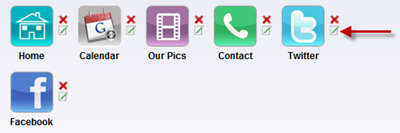
8- Choose a Logo, change Background Image ( You can upload your Own ). Now you have Six options as you can see on the left side. It is a Live Demo where you can test your app. Remember, you must have this Six Options, you cannot delete any otherwise you cannot proceed further. You can change the Icons, their names and functions.


app options

To change the icons, click on edit and change the name and icon.

9- To change the functions of these icons, click on any icon on the live demo and than click on CHANGE PAGE TYPE to see the list of different functions. Give a title to your Page Type.


android app building

android functionality


NOTE: When adding Twitter or Photobucket feed, you have to validate it first from feedvalidator . You will get a new URL and you have to use it. 

And in case of RSS Feed Burner URl, u have to add.


http://feeds.feedburner.com/TntByStc?format=xml


Replace TntByStc with your feedburner title. The Red one is extra code to run it on the App


Now i will show you my customized App


build android application


As you can see i put the above options. I uploaded my own icons and gave them a unique name and changed their functions from default. The home tab is my feed burner Url. My readers can easily read all the latest news through this app. Also i placed Facebook page, Contact and Website. You can customize it as you want. Just choose from the menus mention in step 9 and place whatever you want. After every change do not forget to SAVE. After completing all the six features, save your app and hit continue.


10 - Next step is your APP Setting. Choose Android option and a beautiful Splash screen. Leave the Advertising option with NO because the other options are useless because if you have to join those ad networks than your app should have huge stats which at time being you do not have because your app is not published on Android Market so leave it with NO but if your app gets good stats than you can get Advertisers as you can see the fourth option ( HTML - create custom ad ). You can place advertiser's banner with his URL. To use Ad Networks, you must publish your App in Android Market ( Further written below about Publishing the app in Market )

11- Save and Continue

12- Now give your app some Information


make android app

App logo is that logo which appear on Phone

13- Save and continue to the next step of Notifications. After giving a Notification message, continue to the next and final step.

14- I do not have to explain this step :) it is very easy and you can follow the instructions given to you by them.

YOUR APP IS READY ! But you must try it first with Live Demo From MY APPS link.

Now some important things: If you wish to publish your app to android market, you have to pay a one time fee of 25 dollars but it is not necessary because you can download your app and can upload it on any file hosting and than you can give that link to others. You can test my app on your Android Phones or you can test my App Online


If you wish to make changes to your app than you can do it by going to My Apps Link and than click App Management. You do not have to download the app again and again after every change. The change will happen automatically to all the users because this app is connected to internet.


Now you can share this app with your readers. Enjoy :)


Guest post by Haider Afridi. Running a Fan Club on Celebrity Salman khan at skfanclub. You can contact him @Facebook

Thursday, 3 November 2011

Top 9 Biggest Advertisments Ever


big bottle ads

Ever wondered about the top 10 biggest advertisements ever? Advertisement have always been so important in providing a kick back to a company's well being in the market. Once advertisers concentrated on the quantity of advertisements employed.


But now with the world becoming a global village, where a single incident could make or break a company's fortune in the worlds business, the race of hosting the largest advertisement wonders is still on fire. Such extraordinary efforts in the advertisement industry is to achieve that viral cause.


The advertisement wonders that we are going to look in a moment have become viral and host companies are enjoying an ever ending flavor of this massive free advertisement.


#1 Betfair.com


Betfair.com holds the record of the worlds 'largest advertisement hoarding' by Guinness Book of World Records. A massive field was created, to welcome the football players for Euro Cup 2008, over a time span of 4 months saying "No 1 For Football And Still Growing'.


The advertisement was laid by 50,000 flowers that made up an each letter of 130 feet! The area covered by the advertisement hoarding was about 50 football fields.


#2 KFC (Kentucky Fried Chicken) Logo


KFC logo was build in desert Nevada, in a span of 6 days. Viewing such logos with Google Maps eye, is always fascinating. The logo was filled up with 65,000, 1 square feet tiles covering an area of 87,500 square feet.


The bench mark was set in 2006 when KFC had a major logo change.


kfc largest logo


#3 Biggest Coca Cola Logo Ever


The tycoon soft drink company, Coca Cola celebrated their 100th anniversary with laying down world's largest Coca Cola logo ever. The benchmark was set in Northern Chile Africa, featuring 70,000 empty Coca Cola bottles.


Beneath the logo it said , 100 anos, meaning 100 years. The logo was 50m tall and 120m wide and was clearly visible with Google Maps eye.


coca cola largest desert logo


#4 Worlds Biggest Gillette Shave


Street Advertisement Services in UK built up largest Gillette shave, where a huge Roger Federers face was painted onto a Rugby ground measuring 70m x 50m, for 2011 Wimbledon tournament.


gillette worlds largest shave


 3000 liters of paint and Industrial spay paints, were used to sketch the celebrity's face. Further 1000 liters of shaving foam was added to Rogers stubble, that was then shaved off with lawn movers to set the worlds largest Gillette Shave ever!


#5 Biggest Swissair Barley crop


With the 4 months of work, over an area of 100,00 square meters, Spring Barley was grown at Munich Airport to create the worlds largest Swissair Barely Crop Advert. The crops together made out the name Swissair with the company website mentioned below.


swissair worlds largest ad


#6 Dubai Bil Board


Dubai holds the record of hosting worlds largest billboard costing $3.2 million that runs over a distance of 1.5km. The adverts would be launched in 40 different countries and would take 12 months to complete the entire project. The adverts have been made with vented biodegradable recycled PCV, making the boards 100% friendly.


The billboard will be funded by 100 sponsors, including 40 premier sponsors.


dubai biggest bill board


#7 Worlds Largest Building Wrap (Transformers Movie)


This particular example set the record for being the worlds largest building wrap. To promote the launch of the latest Transformer Movie, revenge of the fallen, nation wide, Luxor Las Vegas hotel was covered by the popular movie wrapper.


The wrapper measures in 100,000 square feet covering the entire 500 feet hotel.


transformer biggest wrapper


#8 Coop's Paid-3D Advert


Nationwide Insurance advertised a fictitious paint company, 'Coups's Paint' in Columbus U.S. The building holds a huge banner with 3D paint spill effect over the parked cars near by. The ad covered an area of 400 square meters.


3d paint ad


#9 Worlds Biggest Road Sign-By Nokia


Nokia made the worlds largest road sign which weight over 2 tonnes and equal the size of 2 double Decker buses. Next to London Bridget, the arrow sign was hoisted 50m into the air. Nearby people could text their favorite location and that displayed on the arrow electronic screen. Arrow also pointed towards that location.


nokia biggest road sign


Guest Post by Hassam Ahmad Awan. MBT's Gold Star Guest Author.

Wednesday, 19 October 2011

Always Drive Traffic, Never Buy Traffic

drive-trafficToday i will explain you in detail with my personal experiences on Driving traffic on blog/website. First of all, a short tip to drive traffic on your blog/website for FREE. If you want free traffic, than simply establish a good looking blog, write lengthy and quality articles almost daily. If you continue doing this, you will surely have thousands of visitors in a short span of time.

Ok, now the main thing which i want to share with you is the meaning of ALWAYS DRIVE TRAFFIC, NEVER BUY TRAFFIC. There is a big difference between Good Traffic and Good Quality Traffic. Always remember that good traffic is not enough, you should have Quality traffic.

If you want thousands of visitors on your blog/website daily and you can spend money, than advertising is the best opportunity. But the question is WHERE TO SPEND THE MONEY? Obviously your money is very precious and you do not want to loose even a single dime of it. So choosing the right Advertising Network is very important. You may have seen many websites offering Thousands of Guaranteed Visitors for just few dollars. But you know, that traffic is only good traffic, not Quality traffic. It will not help you in getting a good page rank nor will it help you in making money. I have experienced such Ads Network LINKBUCKS. They provide 10,000 visitors for just 10 dollars ! but believe me, that traffic was NOTHING for me. It was simply a waste of time and money. Because in that case, your ad is shown forcefully to the user. Just think by yourself, when you click to download something and a window opens saying that you have to wait for 10 seconds to resume the download, Have you ever seen the advertisement that is shown to you in those 10 seconds ? NO. You just wait for those 10 seconds and as the time is over, you simply leave the ad and go to your Download file Page. Same will happen to you if you advertise on these networks. Your page will be loaded in front of others forcefully and they will just ignore it. SO please never try these Ads Networks. They will give you NOTHING. This is BUYING Traffic.

If you really want to advertise your website/blog, than you must choose any one of the following :

  1. Google Adwords
  2. Facebook Advertising
  3. Chitika
  4. Adbrite
  5. Clicksor


I personally tried Adwords but believe me i was not satisfied due to my low budget. If you have low budget for Advertising, than i will strongly recommend you to use Facebook Ads. They will help you a lot. But if you have a strong Budget, than you can go through any of the above.

How to create effective Facebook Ad?

facebook-ads1Just log in to Facebook, Go to Ads tab ( mostly in your Sidebar ) , Create a Campaign and finally create an ad. Give a strong Description and an attractive Picture . Also remember that give Description relevant to your blog's Content. Do not fool people by SAYING SOMETHING AND GIVING SOMETHING. It will surely not help you. Now time for placing Bids ( How much you want to pay for your Ad ). There are two methods CPC  ( Cost Per Click ) and PPC ( Pay Per Click ). I personally tried these both and i will recommend you to use CPC ( Cost Per Click ). Because in Paying Per Thousand Impression, there is no guarantee that you will got the clicks on your Ad. In my case it happens, i got 4000 impressions and got just 4 clicks but i have to pay 4 dollars for impressions. Just imagine, 4 dollars for for clicks ( visitors ) . How costly it is :P. So i recommend CPC because there is a guarantee that if you are paying you will get the click ( visitors ). I personally tried and believe me i got more than 1,700 Likes on my fan page for just 30 dollars. In case of website/blog, 1,700 quality visitors for just 30 dollars.

You can adjust your price of the ad. If you have a good budget, than you can pay through the suggested Bid which Facebook gives you. If you will place the suggested bid, than your ad will be shown fastly on the entire Facebook network. But if you choose your price and a low price, just like me, i placed price for my ad 0.02 dollars, in this case due to low price your ad will appear slowly on the entire network but, it will bring quality traffic. This totally depends on WHAT IS YOUR BUDGET.

So i think now you got the meaning of ALWAYS DRIVE TRAFFIC,NEVER BUY TRAFFIC. You buy traffic through the networks like Linkbucks and you Drive traffic through facebook like networks. Driving traffic will surely give you a better page rank and many other gifts. In case of facebook ads, your ad is just shown to the user and now it is his will that whether he wants to click or not. This is DRIVING TRAFFIC

Hope you enjoyed this little guide. :)


Guest post by Haider Afridi. Running a Fan Club on Celebrity Salman khan at skfanclub. You can contact him @Facebook